Lorem Ipsum Generator
I recently re-implemented my Lorem Ipsum Generator with code at github (see the project there: [1]
I used to have problems when wrapping over the full quote - but I added a sanitycheck script for it so I guess that is taken care of. Even pretty large outputs can be generated in a reasonably short time.
$ time lorem --foo -n 5
Foo. Foo hoo? Foo bar.

real	0m0.080s
user	0m0.064s
sys	0m0.016s

$ time lorem --foo -n 5 | wc -w
5

real	0m0.081s
user	0m0.065s
sys	0m0.018s

$ time lorem --foo -n 9999999 | wc -w
9999999

real	0m3.661s
user	0m3.563s
sys	0
The new implementation currently has the following arguments:
usage: lorem [-h] [-v] [-t] [--words N] [--sentences S] [--lines L]
             [--chars C] [--lorem] [--decamerone] [--faust] [--fleurs]
             [--strindberg] [--spook] [--strandberg] [-q Q] [--lower]
             [--upper] [--randomize]

lorem - Create more or less random lorem ipsum text.

optional arguments:
  -h, --help            show this help message and exit
  -v, --version         show program's version number and exit
  -t                    run self-tests and exit

output format (mutually exclusive):
  --words N, -n N       number of words
  --sentences S, -s S   number of sentences
  --lines L, -l L       number of lines
  --chars C, -c C       number of characters (excl. final newline)

qoute selection:
  --lorem, --cicero     "Lorem ipsum dolor sit amet..."
  --decamerone, --boccaccio
                        "Ser Cepperello con una falsa confessione..."
  --faust, --goethe     "Ihr naht euch wieder..."
  --fleurs, --beaudelaire
                        "Lorsque, par un décret..."
  --strindberg, --hemsöborna
                        "Han kom som ett yrväder en aprilafton..."
  --spook, --emacs      "Asset csystems BATF Blowpipe Soviet..."
  --poe, --raven        "Once upon a midnight dreary, while I pondered, weak
                        and weary,..."
  --strandberg, --foo   "Foo. Foo hoo? Foo bar. Foo bar, baz..."
  -q Q, --quote Q       select source by index instead, q = 1, 2, ...

options for sentences:
  --lower               all lower case (default false)
  --upper               all upper case (default false)
  --randomize           randomize order (default false)
It is GPLv3 so it can be forked :-)
The new implementation has support for randomize:
$ lorem --poe --words 31
Once upon a midnight dreary, while I pondered, weak and weary, Over many
a quaint and curious volume of forgotten lore, While I nodded, nearly
napping, suddenly there came a tapping,

$ lorem --poe --words 31 --randomize
Pondered, Lenore! Merely fact so silence more. Presently and radiant
separate visiter napping, you so murmured curtain Thrilled in was no token,
And nearly nodded, forgotten was chamber at opened I

$ lorem -s 5 --poe --randomize
Word no fact of at I more! Deep had at sad implore. But floor! Eagerly is, a
ember and my the murmured me, muttered, repeating Tis distinctly sure door;
'Tis the some each nothing and unbroken, more?

$ lorem -n 50 --strindberg --randomize
En och tunna änkan rakt brygga; därför med, han en Aspösund har och gick och
ner åker åt inte i lyckades gästgivaregården, han när som ville hissa stopp
för Kroken satt nyfiken blå och Carlsson ett om det Livlig, halvpund och
gubben jag var befattning kan Han årorna medan roret,
Old Implementation
I once felt a desperate need for a lorem impsum generator (if you do not know lorem ipsum is see [2]) that runs from the console. When I was unable to find one I had to build it myself.
Get the latest version here: [3]
You need python to run it (see [4]).
If you are a windows user you might want to rename the file from 'lorem' to 'lorem.py' and you will probably need to run it with "python lorem.py -n 25" instead of the *nix way: "lorem -n 25".
Documentation
Usage:    lorem [-n|-l|-c] N [-q M]?
          where
          N and M are integers

Note:     If -n -l and/or -c are combined -l has priority over -c that has
          priority over -n.

Examples: lorem -n 10
          Get 10 words of lorem.

          lorem -l 5
          Get 5 lines of lorem

          lorem -c 79
          Get 79 characters of lorem

          lorem -l 5 -q 11
          Get 5 lines of lorem from quote 11

License:  Copyright (C) 2007 Per Erik Strandberg
          This program comes with ABSOLUTELY NO WARRANTY.

          This is free software, and you are welcome to redistribute it
          under the GNU GENERAL PUBLIC LICENSE Version 3.


Options:
  --version   show program's version number and exit
  -h, --help  show this help message and exit
  -n N        Number of Words
  -l L        Number of Lines
  -c C        Number of Chars
  -q Q        Quote index
Examples
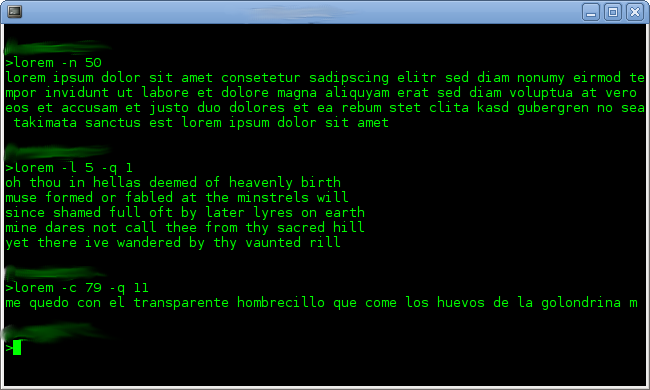
Also see the screenshot above - to see what it looks like "for real" [:)]-|--< .
Fifty words
The switch -n is for words and we want fifty of them. So this gives us fifty words.
>lorem -n 50
lorem ipsum dolor sit amet consetetur sadipscing elitr sed diam nonumy eirmod
tempor invidunt ut labore et dolore magna aliquyam erat sed diam voluptua at
vero eos et accusam et justo duo dolores et ea rebum stet clita kasd gubergren
no sea takimata sanctus est lorem ipsum dolor sit amet
(Location of line breaks may vary - there are none in the real output.)
Five lines
The switch -l is for lines. The switch -q is for quote index (there are about 13 different sources). Values of -q should be from 0 and up. Too large values result in a text written by me (it is all variations of foobar).
So for five lines from source with index 1 this is what you should write:
>lorem -l 5 -q 1
oh thou in hellas deemed of heavenly birth
muse formed or fabled at the minstrels will
since shamed full oft by later lyres on earth
mine dares not call thee from thy sacred hill
yet there ive wandered by thy vaunted rill
79 characters
Last switch is -c for characters (spaces count as characters). It can be used like this:
>lorem -c 79 -q 11
me quedo con el transparente hombrecillo que come los huevos de la golondrina m
Please note that piping this to a file results in a file with one more character than you might first expect:
First we create a file with the output from 'lorem -c 15'
>lorem -c 15 > /tmp/lorem15.txt
Next we run the command 'wc' (word count) with the switch -c. This means that characters will be counted
>wc -c  /tmp/lorem15.txt
16 /tmp/lorem15.txt
wc says we have 16 characters - that is annoying. But let us look at the hexdump of it using 'hd':
>hd /tmp/lorem15.txt
00000000  6c 6f 72 65 6d 20 69 70  73 75 6d 20 64 6f 6c 0a  |lorem ipsum dol.|
00000010
As you can see there are 15 characters of lorem and then a new-line character.
Quote indices
0 - Lorem ipsum, Cicero
1 - Childe Harold's Pilgrimage - Canto the first (I.-X.), Lord Byron
2 - Decameron - Novella Prima, Giovanni Boccaccio
3 - Faust: Der Tragödie erster Teil, Johann Wolfgang von Goethe
4 - In der Fremde, Heinrich Heine
5 - Le Bateau Ivre, Arthur Baudelaire
6 - Le Masque, Arthur Rembaud
7 - Nagyon fáj, József Attila
8 - Ómagyar-Mária siralom, Ismeretlen
8 - Robinsono Kruso (Esperanto), Daniel Defoe
9 - The Raven, Edgar Allan Poe
10 - Tierra y Luna, Federico García Lorca
11 - Hemsöborna, August Strindberg
12 - Random Foobar, Per Erik Strandberg
Non-Ascii Characters like åäö
Some of the quote sources have "exotic" characters in them (non-ascii characters). In lorem 0.5 for example the quote with index 12 is the start of August Strindbergs Hemsöborna. This is what it should look like in the terminal:
>lorem -n 16 -q 12
han kom som ett yrväder en aprilafton och hade ett höganäskrus i en svångrem om halsen
In my gnome-terminal it looks something like this but with really ugly ?'s:
>lorem -n 16 -q 12
han kom som ett yrv?der en aprilafton och hade ett h?gan?skrus i en sv?ngrem om halsen
But if I pipe it to file like so:
>lorem -n 16 -q 12 > /tmp/strind.txt
The file contains the correct characters. This is what the file looks like in Gnu Emacs:
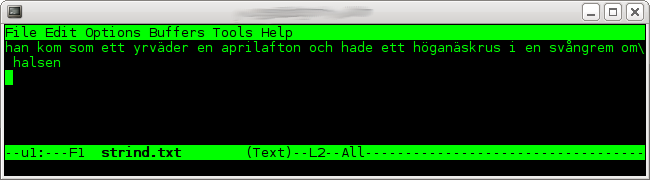
So it might just be a problem with encodings or so - I really do not know. Also: if you modify this file make sure you do so in an editor that supports non-ascii characters or these exotic quotes will be ruined.
Details
This Lorem Ipsum Generator (lorem) is Copyright (C) 2007 Per Erik Strandberg, it is also free software, and you are welcome to redistribute it under the GNU General Public License v 3 (see [5]). lorem comes with NO WARRANTY, to the extent permitted by law.
This page belongs in Kategori Programmering.