CLIPCLOP - Ctrl-C, Ctrl-V
Per Erik Strandberg's CLIPCLOP does pretty much what DOG does but to the clipboard.
Clip copies the contents of a file to the clipboard.
Clop displays the contents of the clipboard on the console.
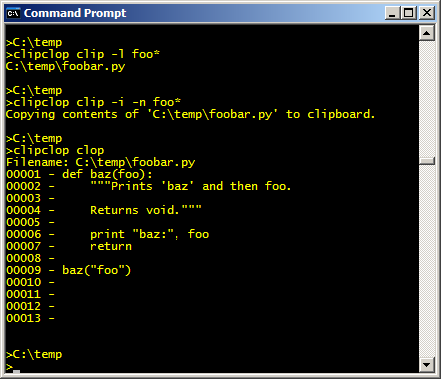
Example: Run Per Erik Strandberg's CLIPCLOP from the console.
First the CLIP-function to list matching files.
Then do the clipping.
Last the CLOP-function.
Download
Per Erik Strandberg's CLIPCLOP can be downloaded in zipped format: clipclop.zip (less than 20 kB)
Usage
NAME
  Per Erik Strandberg's ClipClop

  See http://www.pererikstrandberg.se/projects for
  updates and other releases.

  Per Erik Strandberg's ClipClop is licensed under a
  Creative Commons Attribution-NonCommercial-NoDerivs License.
  see http://creativecommons.org/licenses/by-nc-nd/2.5/


SYNOPSIS
  ClipClop Clop
    or
  ClipClop Clip [/R]? [/I]? [/N]? [/S]? [/L]? [[[DRIVE:]?[PATH]]?[WILDCARD]]*


SWITCHES
  Clip  - Copies contents of files to clipboard - think Ctrl-C.

  Clop  - Pastes contents of clipboard to standard out
          (for example the console) - think Ctrl-V.

  R - Enables recursive search.

  I - Shows line numbers on output.

  N - Displays the name of the files on a separating row.

  S - Print a separator between files.

  L - List only (only to console).

[[DRIVE:]?[PATH]]?
  DRIVE: - For example C: or A:

  PATH   - For example \temp\c-code


[WILDCARD]
  One or more wildcards - patterns to match files.


NOTE
  All switches must come before [WILDCARD]+

  Switches are case insensitive.

  Switches can be started with - instead of /.

  Note that files may start with a - but not with a /.
Requirements
I guess CLIPCLOP requires MONO or Microsoft .NET.
