toTrash
Per Erik Strandberg's toTrash provides a seamless integration of your typical Windows DOS-console and the Recycle-Bin.
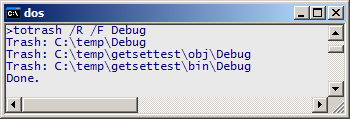
Step One: Run Per Erik Strandberg's toTrash from the console using
simple switches and a few wildcards.
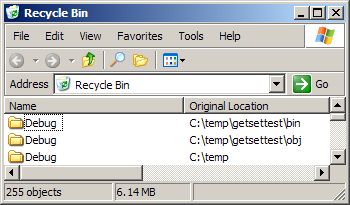
Step Two: If you accidentally moved a file to Trash you can easily restore it.
Just use the regular windows Recycle-Bin interface.
Unwanted files can now easily be deleted. You never have to be scared while
removing files from the console again!
I just got tired of the del, rm, mv and move commands that do not provide the safety net I need when I want to remove files from the console.
What toTrash does is really simple: instead of deleting a file from the console: put not wanted files in the trash, or with other words instead of left-clicking a few hundred files once at a time: put files in the Recycler from the console.
Per Erik Strandberg's TOTRASH is licensed under a Creative Commons Attribution-NonCommercial-NoDerivs 2.5 License. see http://creativecommons.org/licenses/by-nc-nd/2.5/
Download
Per Erik Strandberg's toTrash can be downloaded in zipped format: toTrash.zip (less than 10 kB)
Usage
NAME
  Per Erik Strandberg's TOTRASH

  See http://www.pererikstrandberg.se/projects for updates
  and other releases

  Per Erik Strandberg's TOTRASH is licensed under a Creative
  Commons Attribution-NonCommercial-NoDerivs 2.5 License.
  see http://creativecommons.org/licenses/by-nc-nd/2.5/


SYNOPSIS
  toTrash [/L]? [/R]? [/F]? [[[DRIVE:]?[PATH]]?[WILDCARD]]*


SWITCHES
    L  -  Log only  (does not send to trash).

    R  -  Recursive (searches all possible subfolders).

    F  -  Folders   (Searches for folders not files).

[[DRIVE:]?[PATH]]?
  DRIVE: - For example C: or A:

  PATH   - For example \temp\c-code


[WILDCARD]
  One or more wildcards - patterns to match files.


EXAMPLES
  'toTrash /R /F /L Debug'
    - Searches recursively.
    - Searches for folders called 'Debug'.
    - Only log of items (nothing will be sent to trashcan).

  'toTrash /R *.log'
    - Searches recursively.
    - Searches for items called ending with '.log'.
    - Sends items to trashcan.
    - Typical output:
      Trash: C:\temp\Answer.txt
      Trash: C:\temp\ci.txt
      Trash: C:\temp\classes.txt
      ...
      Trash: C:\temp\features\readme.txt
      Done.
Requirements
All you need is (the free) Microsoft .NET 2.0 platform.
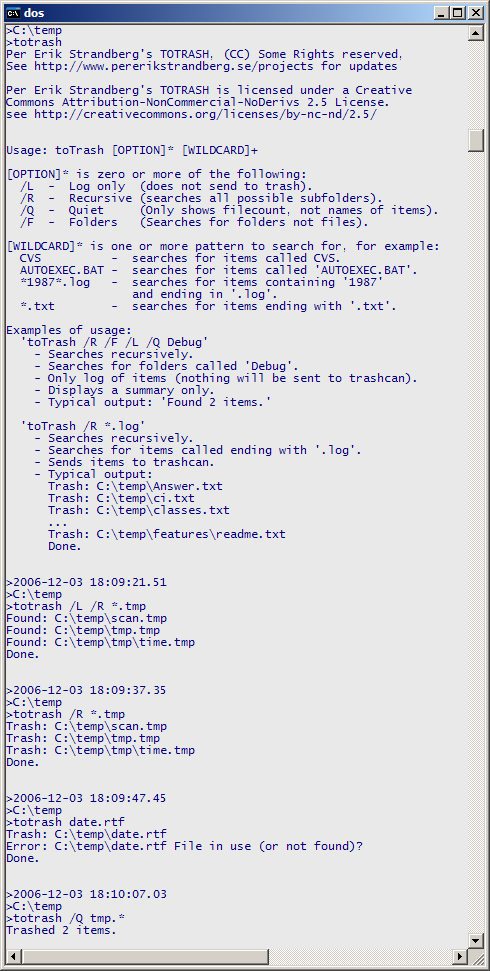
Screenshot
Updated
ToTrash was ported to C# and hence updated in April 2007.
